The Netflix OData Catalog API was announced during the second keynote of Mix10 earlier this year. This announcement also meant that the live preview of the service was now publicly available. This means that all of the movie information built into the Netflix site (movies, actors, genres, release dates, etc.) is now available through an easy to consume service.
I have a very, very unorganized movie collection, and have been trying to write a system to keep track of what I have and where I have it stored. Whenever I tried to write it I always had to stop myself because I could not get the right amount of information about the movies. I even went has far as scraping the information box on movie pages from Wikipedia. This was promising, but I stopped working on the system after a few days.
Now, armed with the NetFlix Catalog API, I can finally get the right amount of information into my system to make it fun and useful. This is a quick demo of how to get information from the NetFlix Catalog Service.
To get going with the NetFlix Catalog API, whip open a new .NET MVC2 Visual Studio Project and get to work.
To access the Catalog API, a Web Reference will need to be added to the project. Right click the project then Add a Service Reference. Complete the dialog box like the picture below:
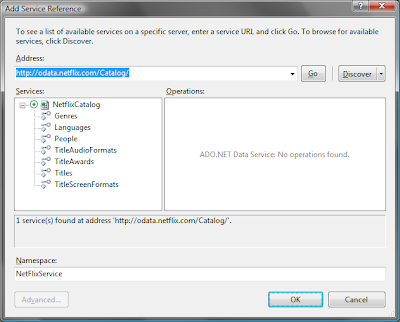
Once the Service reference is added to the project, we can access the NetFlix Catalog data.
From here, you can access the NetFlix Catalog in Visual Studio. Define an instance of a NetflixCatalog service as shown below.
        public ActionResult Index()
    {
        NetflixCatalog _nfCat = new NetflixCatalog(new Uri("http://odata.netflix.com/Catalog/"));
        DataServiceCollection<Title> _titles = new DataServiceCollection<Title>();
        var query = (from t in _nfCat.Titles where t.ReleaseYear < 1950
             orderby t.ReleaseYear select t).Take(50);
        try
        {
            _titles.Load(query);
        }
        catch (InvalidOperationException excep)
        {
            Console.WriteLine(excep.Message);
        }
        var titles = _titles.ToList();
        return View("Index",titles);
    }
Please note that this code will not run without adding a reference to a WindowsBase dll. Mine was at C:\Windows\winsxs\msil_windowsbase_31bf3856ad364e35_6.0.6000.16708_none _9540b0033275cea4\WindowsBase.dll
Use the service to build a linq query, then load that query into a DataServicesCollection object. Use the following code to display it on a page. Apologies in advance for the terrible way of doing a numbered list.
    <p>
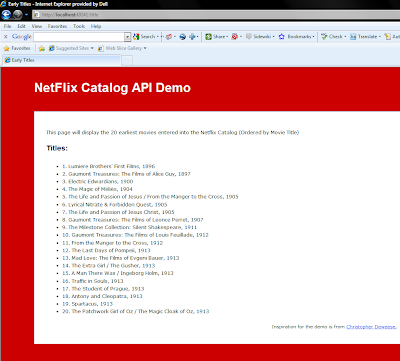
   This page will display the 20 earliest movies entered into the Netflix Catalog (Ordered by Movie Title)</p>
<h2>
   Titles:</h2>
<ul>
   <%int count = 1;  foreach (var title in (IEnumerable<NFCatalog.NetFlixService.Title>)Model)
     { %>
   <li>
       <%=count %>. <%= title.Name%>, <%= title.ReleaseYear%></li>
   <%count = count + 1;
     }; %>
</ul>
The final page is displayed like this: